
Get started with AI and our MCP Server.
MYBANX.IO MCP Server
Description
Mybanx.io is an open banking platform that allows you to connect to your bank accounts and access their data. This MCP server allows you to connect Claude, Claude Desktop, ChatGPT, Mistral Le Chat or any other AI tool with our MYBANX.IO data platform to access your financial data or data from other companies sharing their bank accounts with you.
This server is developed and run in Europe.
Your data are stored in Europe on the mybanx srl's cloud servers.
While your financial are stored in EU on Mybanx's SRL hosted infrastructure on Azure, once the AI tool is connected, hey have access to your data. Depending on the tool you are using for AI, data might be stored and persisted on servers outside of EU.
Since you decide to share data with ChatPGT, Claude or any other third party; pay attention to the contract, terms and conditions, privacy policy you are accepting with that third party.
Features
- You can list all the companies you have connected to MYBANX.IO
- You can list all the accounts connected to MYBANX.IO for a specific company
- You can get the balance of a specific account
- You can get the transactions of a specific account
- You can perform search queries on the accounts
- Using your AI Agent, you can generate reports, graphs or better understand your financial data by asking questions in natural language.
Setup
- Visit the Mybanx.io website, create a user account and connect your bank account.
- In the Application menu, click "Collect Data" and select "mybanx's MCP Server", then "Start".
- Visit the Anthropic MCP Directory
- Find and connect to MYBANX.IO
- Complete OAuth authentication with the Application Key and Client Key provided by MYBANX.IO in the "Applications" menu.
- Configure any required settings
Authentication
This server requires OAuth authentication. You'll need:
- Valid MYBANX.IO account
- Valid Application Key and Client Key issued by performing the "Collect Data" process.
Once Claude or ChatGPT is connected, you will need the Application Key and the Client Key.
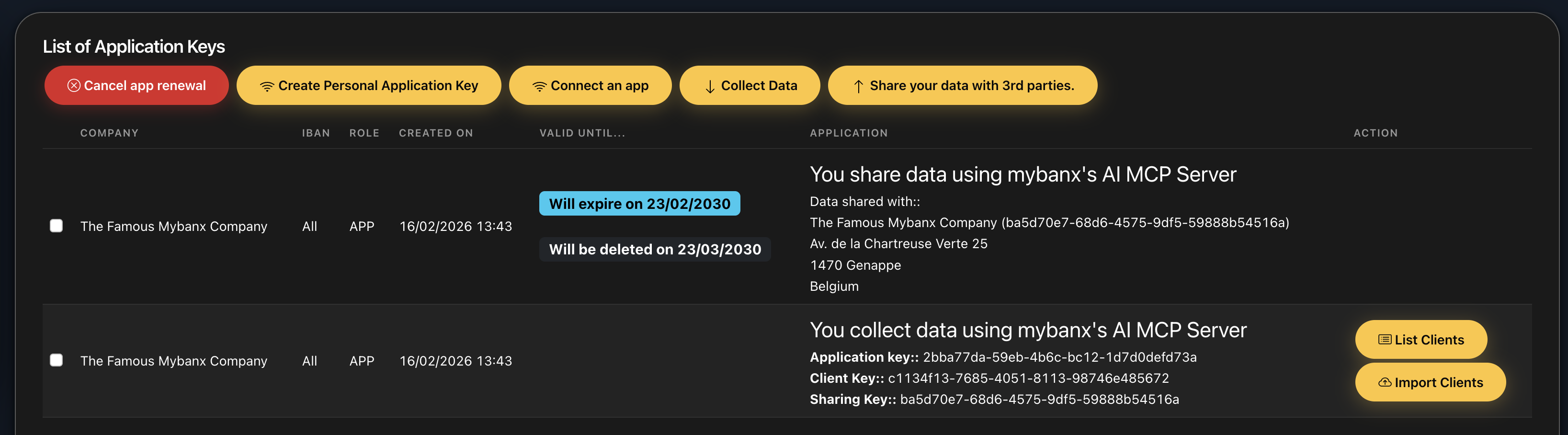
Examples
Here are the credentials for the examples provided within the fictive "The Famous MyBanx Company":
- Application key: 2bba77da-59eb-4b6c-bc12-1d7d0defd73a
- Client Key: c1134f13-7685-4051-8113-98746e485672
Once requested by Claude, provide the above credentials to connect to the "The Famous MyBanx Company" account and access the data for the examples below.
You can use mybanx's MCP server to:
- List all the companies you have connected to MYBANX.IO, "List all my companies"
- List all the accounts connected to MYBANX.IO for a specific company, "For The Famoux MyBanx Company, list all accounts and hide the balance."
- Get the balance of a specific account, "For the previous bank account, wat's the balance today?"
- Get the transactions of a specific account, "List all incomes on that bank account: BE0123456789"
- Perform search queries on the accounts. "List all incomes for the last quarter of 2025 and generate a comparison graph with first quarter of 2025." Ask Claude to generate graphs or reports based on the data you have access to.
Privacy Policy
See our privacy policy: https://mybanx.io/legal/20250218-pp-mybanx.pdf See our terms and conditions: https://mybanx.io/legal/20250218-tc-mybanx.pdf
Support
- Email: [email protected]
- FAQ: https://mybanx.io/home/faq
- Developer documentation: https://apidocs.mybanx.io/reference/getting-started
- Issues are reported on our GitHub: https://github.com/orgs/mybanx/projects/1
Videos on Youtube.
First, let's see how to connect your preferred AI chat (in this example Claude Desktop) to mybanx.
You'll need an already registered user and one or more connected bank accounts.
Asking Claude Desktop to generate a graph based on our expenses in the demo account; list all payments we did in december 2025 or search for our best top 3 clients in 2025.
Updated 5 months ago